

Discover why leads get rejected, how to improve lead acceptance rates, and how PX response codes help publishers optimize traffic and monetization.
From "Unable to Monetize" to Knowing What to Improve
You send leads into the marketplace. Some find buyers. Others don't.
But when a lead doesn't sell, how do you know what went wrong?
Was it a duplicate? Missing consent information? A mismatch with buyer requirements? Or simply a lack of buyer demand?
Until now, many unsuccessful submissions returned the same message: Unable to monetize.
While accurate, that response offered little insight into what happened or what a publisher could do differently.
A lead rejected because of missing consent information requires a very different action from one that doesn't sell because buyers have reached their daily caps.
Starting October 15, 2026, PX is changing that by introducing response codes.
Publishers will gain clearer visibility into why their leads aren't selling, helping them identify opportunities to improve lead acceptance rates, optimize traffic, and unlock more revenue potential.
Why Do Leads Get Rejected by Buyers?
A lead can go unsold for several reasons, and not all of them indicate poor lead quality.
Why a lead didn't sell | What publishers can do |
|---|---|
Duplicate lead | Review traffic sources and deduplication practices to reduce repeat submissions. |
Consent or compliance issue | Identify gaps in consent collection, including TCPA requirements or missing verification certificates. |
Source or traffic quality issue | Evaluate traffic sources and adjust submissions to align with buyer requirements. |
Targeting mismatch | Refine targeting based on the lead types buyers accept. |
Geographic coverage mismatch | Prioritize locations with stronger buyer coverage where possible. |
Invalid contact information | Improve data collection and validation before submitting leads. |
Missing or invalid lead details | Review required fields and correct recurring submission errors. |
Buyer capacity or budget limits | Recognize when rejections stem from buyer availability rather than lead quality. |
No active buyer demand | Use demand-related feedback to inform traffic allocation and optimization decisions. |
How PX Makes Rejection Reasons More Actionable
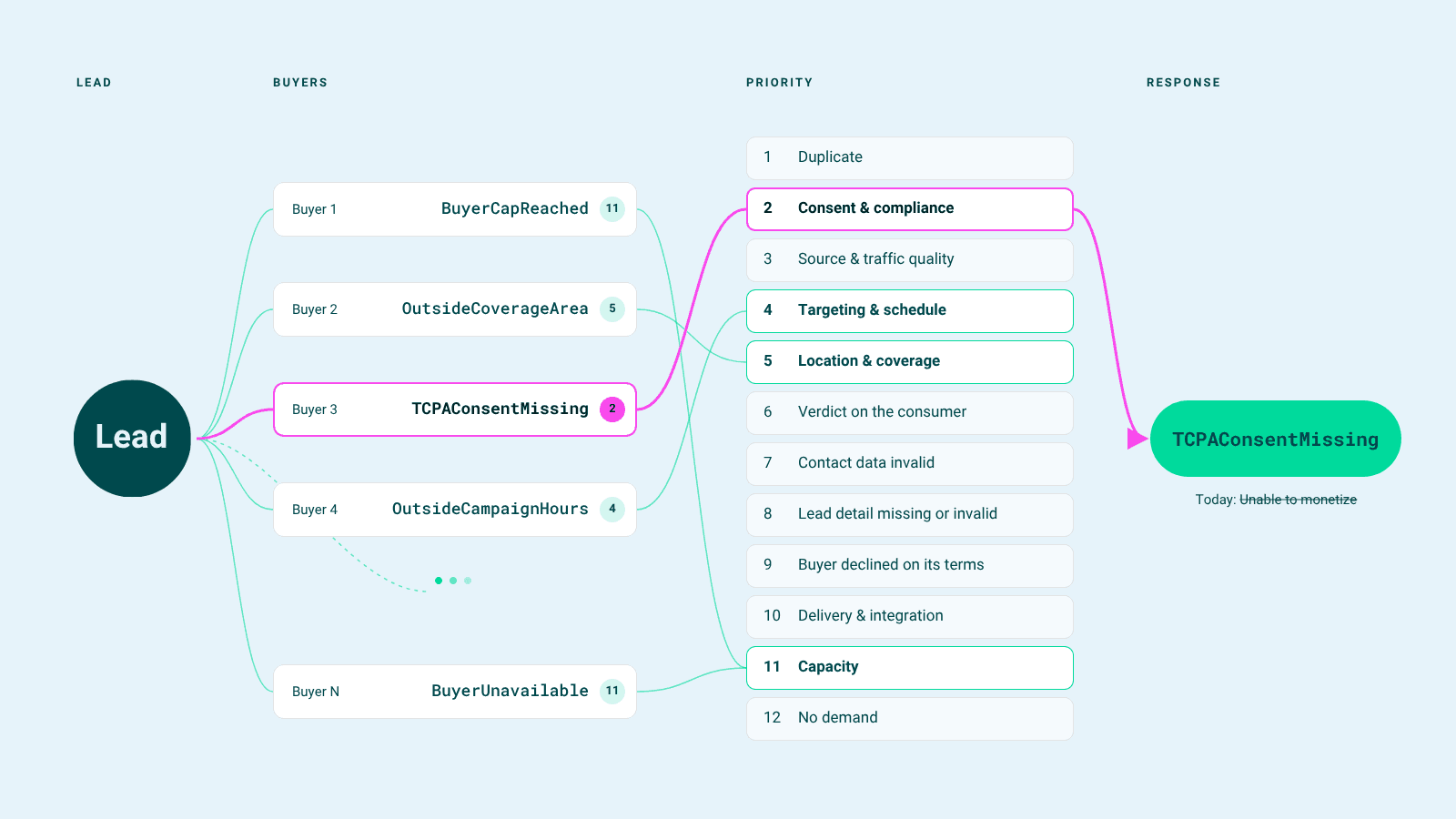
When a ping or post doesn't result in a sale, PX evaluates the rejection reasons and returns a standardized response code explaining the outcome.
For example, a response like BuyerFilterNotMet indicates that a lead didn't meet buyer targeting requirements. In private setups, publishers may receive more specific details, such as BuyerFilterNotMet-CreditRating.
PX first validates incoming leads. If a submission fails initial validation, PX returns the relevant error before the lead reaches buyers.
For valid leads that don't sell, PX evaluates buyer responses and returns the highest-priority applicable rejection reason.
Response codes apply to ping post integrations for leads and calls, as well as Match Ping. Direct Post is not included.
The full list of response codes, definitions, and recommended actions is available in the API documentation.
Turn Rejection Insights Into Better Monetization
1) Improve lead acceptance rates
Repeated rejections can reveal patterns that aren't immediately obvious.
For example, if a particular traffic source consistently generates leads with missing consent information or invalid contact details, publishers can investigate and fix those issues upstream.
Addressing avoidable rejection reasons gives future submissions a better chance of meeting buyer requirements.
2) Reduce wasted traffic
Not every unsold lead needs fixing. Sometimes, the issue is simply that the lead doesn't match current buyer requirements or demand.
Understanding these distinctions helps publishers avoid spending time optimizing the wrong things.
Instead, they can prioritize traffic sources, locations, and lead attributes that are better aligned with marketplace opportunities.
3) Make smarter revenue decisions
Lead volume alone doesn't tell the full story of performance.
By understanding why leads aren't monetizing, publishers can identify which issues are within their control, where optimization efforts may have the greatest impact, and when buyer demand is the limiting factor.
Better Buyer Feedback Creates a Stronger Marketplace
When publishers receive clearer feedback from buyers, they can better align their traffic with buyer expectations. Buyers, in turn, have a greater opportunity to receive submissions that match their requirements.
This creates a more informed feedback loop between buyers and publishers, helping reduce avoidable rejections and improve marketplace efficiency.
Frequently Asked Questions
1) What are lead rejection response codes?
Lead rejection response codes explain why a submitted lead wasn't accepted or purchased. They help publishers identify issues such as duplicate submissions, missing consent, invalid data, targeting mismatches, and limited buyer demand so they can make more informed optimization decisions.
2) How can publishers improve lead acceptance rates?
Publishers can improve lead acceptance by identifying recurring rejection reasons, validating consumer information, meeting consent requirements, and aligning traffic with buyer targeting criteria. Response codes help identify where improvements may be needed.
3) Does an unsold lead always mean poor lead quality?
No. Leads may remain unsold because buyers have reached their budgets or daily caps, don't cover a particular location, or aren't actively purchasing that lead type. Understanding the reason helps publishers avoid making unnecessary changes to otherwise valid traffic.
What Happens Next
PX response codes will begin rolling out to select publishers on October 15, 2026.
If you're already working with PX, our team will contact you before any changes are made to your integration.
Because knowing why a lead didn't sell is the first step toward helping the next one sell.

Ready to take the lead?
Tell us a bit about your request and we’ll route it to the right team.